Executive Summary
Most "churn is high" conversations stall because the room is looking at one blended number. This is the framework I run first to break that number apart: a cohort retention table to see when subscribers leave, a monthly churn rate split by segment to see who leaves fastest, a survival curve to see the shape of the drop-off without the month-to-month noise, and an LTV estimate to turn all of it into a number the business can act on, like how much it can spend to acquire each segment.
It's built on 2,000 synthetic subscribers across 18 acquisition cohorts, with a churn pattern that mirrors what I've seen in real subscription businesses: newer subscribers churn faster, higher-tier subscribers churn slower, and both effects compound over the first year. The point isn't the synthetic numbers. It's a model that runs immediately and takes a real dataset in the same shape.
Why this exists
Churn is the number that decides whether growth compounds or leaks out the bottom. But "what's our churn rate" is usually the wrong first question, because a single monthly percentage collapses three very different problems into one: an onboarding problem (subscribers who never got to value), a fit problem (subscribers on the wrong plan for what they need), and a value-erosion problem (subscribers who got value once and stopped). Each one needs a different fix, and a blended rate can't tell you which one you have.
This framework exists to separate those signals before anyone commits to a fix. It's the same four views I'd build in week one on a subscriptions business, whether the goal is diagnosing a retention problem, sizing an LTV-to-CAC ratio, or just building the dashboard a growth team should already have.
1. Cohort Retention Table
What it shows. Each row is an acquisition cohort, the subscribers who joined in a given month. Each column is a month since acquisition. Each cell is the percent of that cohort still active at that point. Reading down the diagonal shows whether retention is improving or worsening cohort over cohort. Reading across a row shows the shape of one cohort's drop-off.
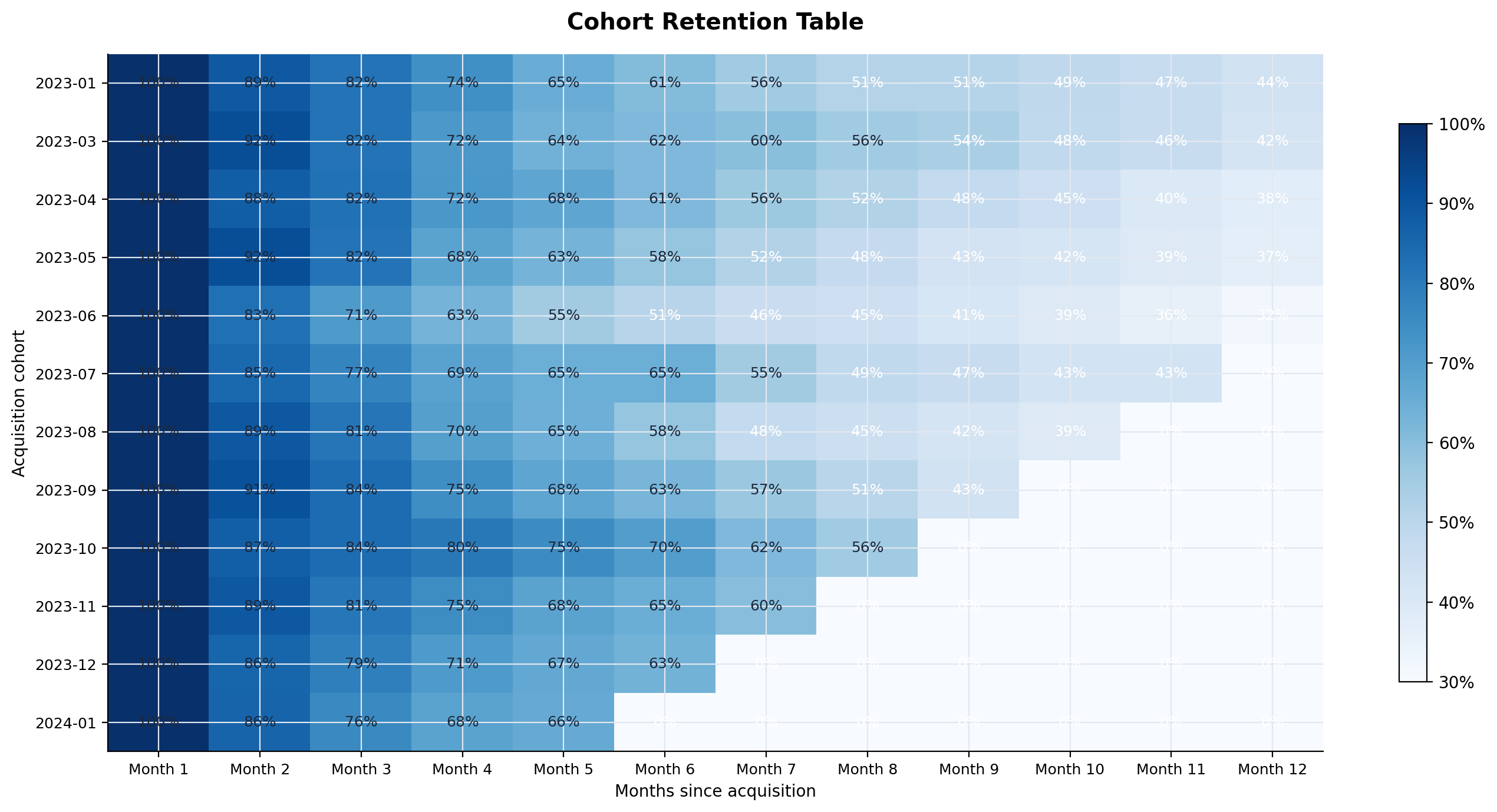
How I'd use it. Scan the first three columns first. That's the onboarding window, and it's usually where the biggest, cheapest-to-fix leak lives. If Month 1 retention is roughly flat across cohorts but Month 3 keeps drifting down in the more recent rows, that's a signal something upstream changed, a new acquisition channel bringing in a worse-fit subscriber, a pricing change, a feature that regressed. The table tells you where to look before you touch the product.
2. Monthly Churn Rate
What it shows. The percent of at-risk subscribers who cancel in a given month of their lifecycle, split by plan. "At risk" means still active entering that month, so the denominator shrinks as subscribers churn out, which is what makes this different from a flat cancellations-per-month count.
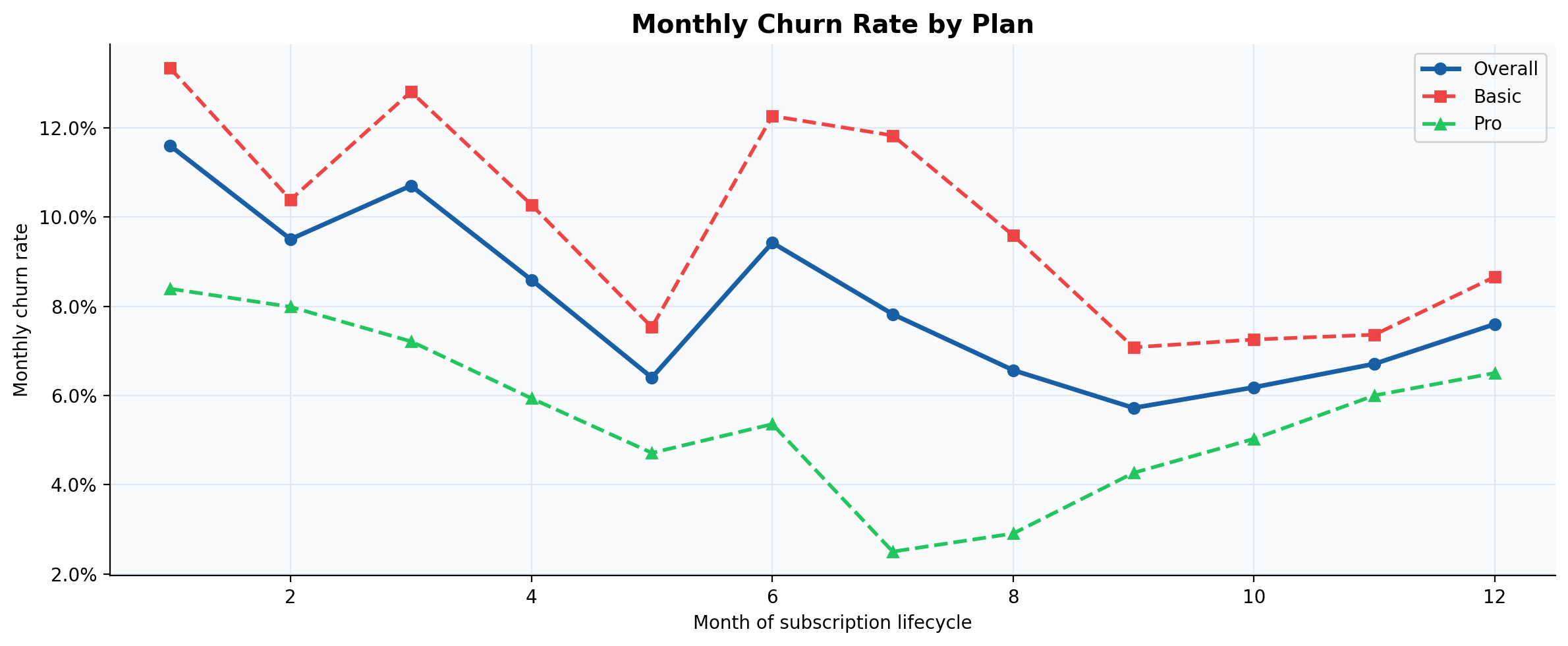
Why split by segment. A blended churn rate here would land at 8.1%, a number that describes no one. Basic runs at 9.9%, Pro at 5.6%. That gap is the difference between a plan that needs a pricing or packaging fix and one that's healthy. Blending them would send the team fixing the wrong plan, or worse, applying a Basic-shaped fix to a Pro-shaped business.
3. Survival Curve
What it shows. The share of subscribers still active after N months, plotted as a smooth curve instead of a month-over-month rate. It answers a cleaner question than the churn-rate chart: not "what's the risk in any given month" but "what fraction of the cohort is left by month N."
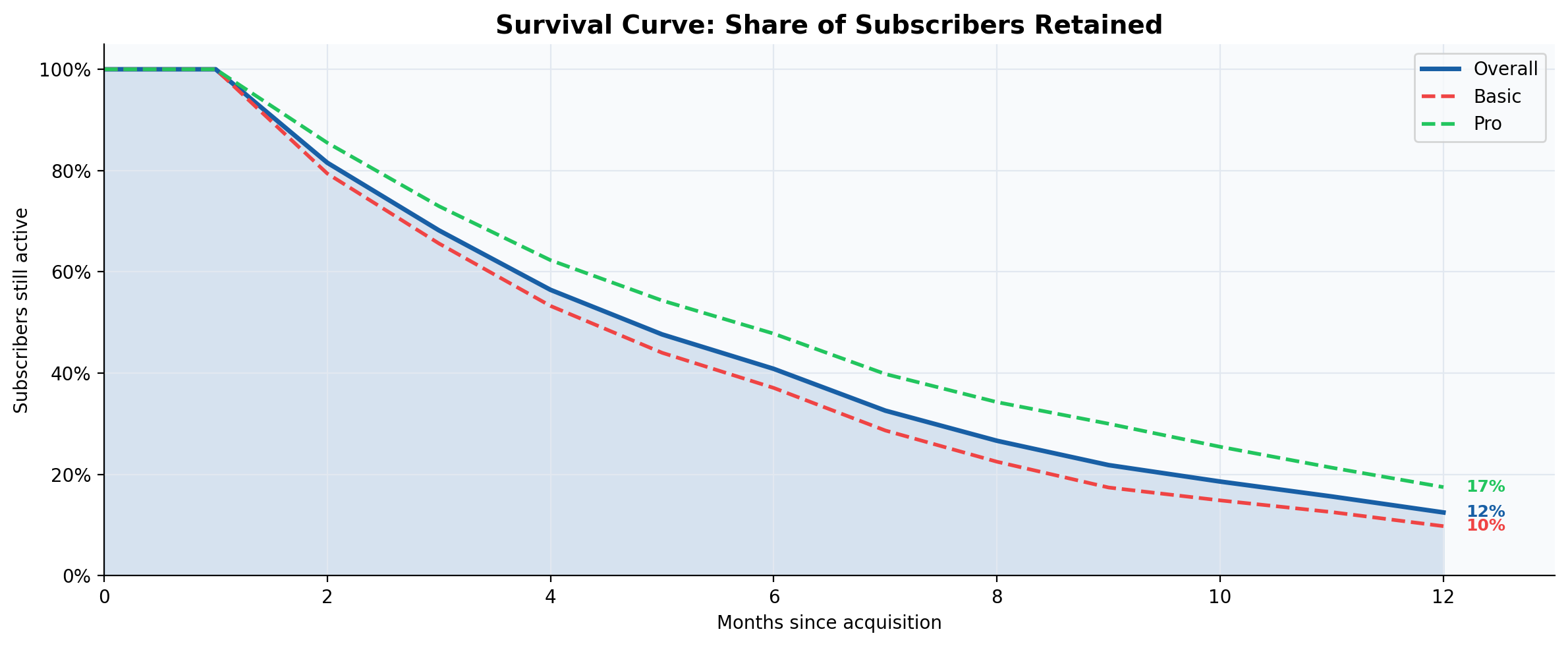
Why it matters. The shape tells you where to spend effort. A steep drop in the first two or three months, which is what this curve shows for both plans, points to an onboarding or early-activation problem: subscribers who never got far enough into the product to see its value. A survival curve that instead sags gradually over months 6 through 12 would point to value erosion, a different problem with a different fix, usually re-engagement or a product gap rather than onboarding.
4. LTV Estimation
What it shows. Two ways to estimate lifetime value: the simple formula, ARPU divided by monthly churn rate, and a survival-curve-weighted estimate over a fixed horizon, here 24 months. The simple formula assumes constant churn, which is rarely true early in a subscriber's life, so I run both and treat the gap between them as a sanity check.
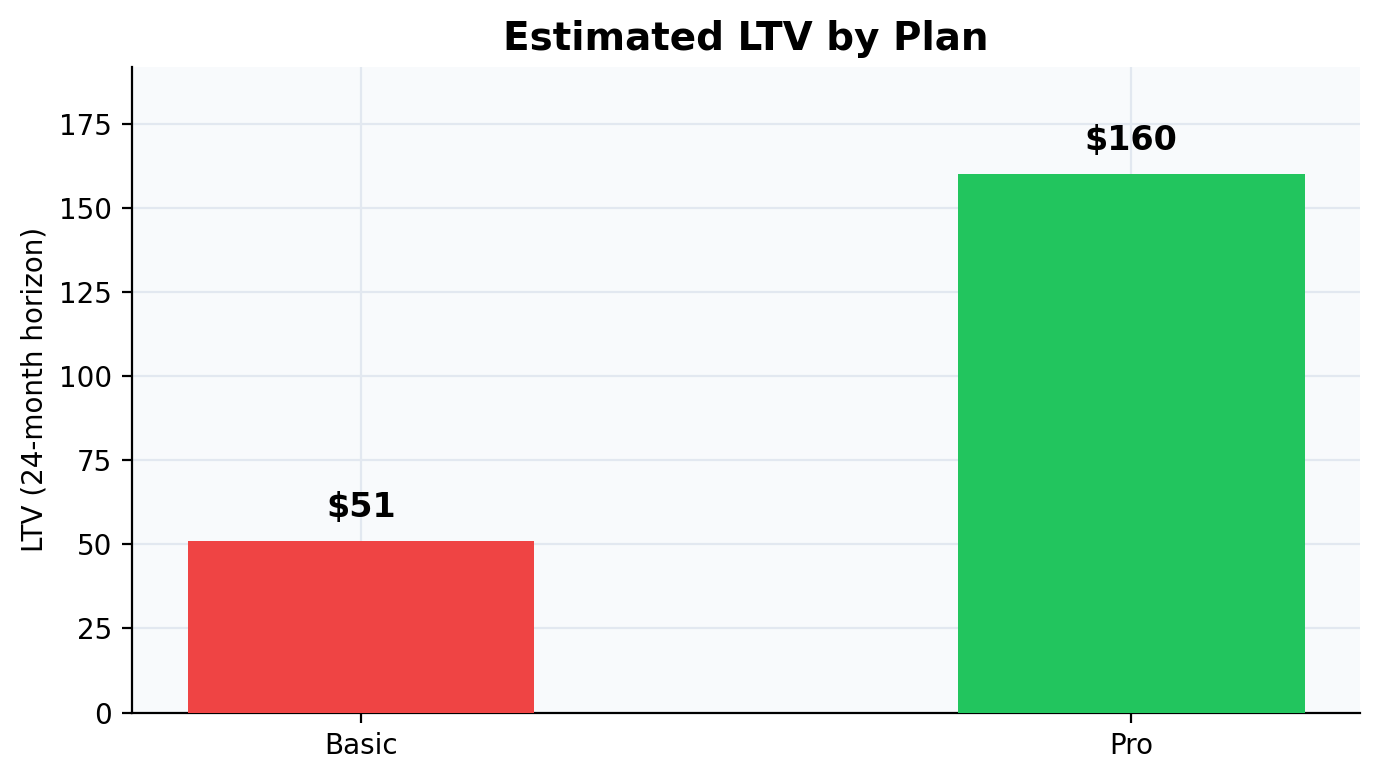
The takeaway. Basic ARPU is $9.96 against Pro's $24.99, a 2.5x gap. But the 24-month LTV gap is roughly 3x, because Pro's lower churn compounds on top of its higher price. That compounding is the number that should set how much a business can afford to spend acquiring each segment, not the ARPU gap alone.
Key takeaways
Running this framework on real data gives three outputs a growth or retention team can act on directly:
- Cohort retention table — tells you when you're losing subscribers, and whether it's getting better or worse over time.
- Churn rate by segment — reveals which users churn fastest, so onboarding and retention effort goes where it moves the number.
- LTV by plan — quantifies the value gap between segments, which directly informs how much the business can spend to acquire each.
Adapting it to real data
The synthetic dataset exists so the framework runs standalone, with no data pipeline required to see the shape of the output. Swapping in a real dataset only requires one thing the notebook is built around: a subscriber-level table with a cohort assignment, a plan or segment label, an ARPU or revenue figure, and either a churn flag with a churn month, or enough billing history to derive one. Every chart above is generated straight from that shape, cohort table, churn-rate chart, survival curve, and LTV all recompute automatically once the real table replaces the synthetic one.
A note on scope
This is a framework, not a teardown of a specific company: the numbers are synthetic, generated with a set seed so they're reproducible, and calibrated to resemble realistic subscription churn patterns rather than any one business's real data. Treat the charts as a demonstration of the method and the questions it answers, not as a claim about any company's actual retention. The underlying notebook is the deliverable, the charts here are its output.